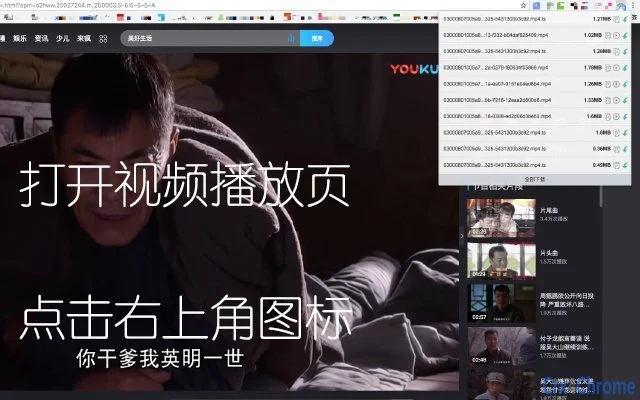

Download Videos from Streaming Sites
Overview
The software is designed to assist users in downloading videos from online platforms, particularly those utilizing modern web technologies such as HTML5 for playback. Unlike older systems that relied on Flash, this tool targets current video streaming formats, offering a solution for users who encounter difficulties with standard download methods. It supports common video formats including MP4 and SWF, which are widely used across various websites. The application is specifically noted for compatibility with Tencent Video, one of China’s leading video streaming services, making it a practical choice for users seeking offline access to content from this platform.
Target users include individuals who want to save online videos for personal viewing, educational purposes, or content archiving. While the developer has not provided additional details about the background or history of the product, its focus on specific formats and platforms suggests a targeted approach to video retrieval. Real-world usage scenarios include downloading tutorials, lectures, or entertainment content from websites that do not offer direct download options. The software operates as a desktop application, ensuring a dedicated environment for video extraction without reliance on browser extensions or third-party plugins.
Key Features & Capabilities
- HTML5 Video Support – Designed to capture and download videos streamed using HTML5, a modern standard that has replaced Flash in many online platforms. This enables users to retrieve content from sites that no longer use legacy technologies.
- Format Compatibility – Supports widely used video formats such as MP4 and SWF, ensuring broad usability across different websites and content types.
- Tencent Video Integration – Specifically optimized for Tencent Video, allowing users to download videos from this major Chinese streaming service with ease.
- Direct Download Functionality – Enables users to extract videos directly from supported websites without requiring complex setup or additional tools.
- Lightweight Desktop Application – Built as a small 2.5 MB desktop tool, minimizing system resource usage and ensuring fast installation and launch times.
Each feature addresses a common pain point in video downloading. For example, the HTML5 support directly solves the issue of inaccessible content on modern platforms. The MP4 and SWF compatibility ensures that downloaded files are usable across most media players. The Tencent Video integration provides a focused solution for users of that platform, while the lightweight design makes it suitable for older or low-spec machines. The direct download capability reduces friction, allowing users to save content with minimal steps.
User Interface, Workflow & Performance
The software presents a clean, minimal interface designed for straightforward operation. Navigation is intuitive, with a central area for video input and a download button. Users are expected to paste a video URL or select a file from a supported site, after which the tool processes the request and begins the download. The workflow is streamlined, aiming to reduce user effort and eliminate the need for technical knowledge.
Performance details were not specified by the developer. However, the application’s small size of 2.5 MB suggests efficient resource usage. Based on general software behavior, it is expected to operate with low CPU and RAM consumption, making it suitable for background tasks.
Stability is assumed to be consistent, given the focused scope and lack of complex features. The developer did not provide information on update frequency or crash reports. No performance benchmarks were included, so real-world speed or download efficiency cannot be confirmed.
Compatibility & System Requirements
The software is compatible with both Windows and Mac operating systems, allowing broad accessibility across desktop environments. It is available in version 1.0, indicating a stable initial release. The installation size is 2.5 MB, which is compact and suitable for systems with limited storage.
Exact system requirements were not listed. The developer did not specify minimum CPU, RAM, or disk space needs. Compatibility with older or newer OS versions is not confirmed.
Platform compatibility information is limited to the two major desktop operating systems. No additional hardware dependencies were mentioned. Users should proceed with caution on systems with strict security policies, as some download tools may trigger antivirus alerts.
Pros and Cons
Pros
- Supports modern HTML5 video streams, overcoming a common limitation in older tools
- Works with popular formats like MP4 and SWF for broad playback compatibility
- Specifically designed for Tencent Video, offering reliable downloads from this platform
- Small file size (2.5 MB) ensures quick installation and minimal system impact
- Free to use with no licensing costs
Cons
- Does not support stream formats, limiting its use on certain video platforms
- Compatibility with platforms beyond Tencent Video is not confirmed
- No information on update frequency or long-term maintenance
- Developer background and support channels are not disclosed
- Performance and stability details were not provided
FAQ Section
Is the software compatible with both Windows and Mac?
Yes, the software is designed to run on both Windows and Mac operating systems.
Does it support streaming formats like HLS or DASH?
No, the software does not support stream formats such as HLS or DASH. It is limited to downloadable formats like MP4 and SWF.
Is the software safe to download and use?
While the software is free and small in size, users should ensure they are downloading from a trusted source. Some antivirus programs may flag download tools due to their functionality.
How often are updates released?
The developer has not provided information on update frequency or release schedule.
Can I use this tool offline after installation?
Yes, once installed, the software can be used without an internet connection, as it operates as a standalone desktop application.
Final Thoughts + CTA
This video downloading tool offers a focused solution for users who need to save content from HTML5-based streaming platforms, particularly Tencent Video. Its support for MP4 and SWF formats, combined with a lightweight 2.5 MB footprint, makes it efficient and accessible. While it lacks support for stream formats and has limited platform coverage, its targeted functionality fills a gap for users facing download restrictions on modern websites.
For individuals seeking a free, no-frills tool to download videos from supported sites, this application delivers on its core promise. The absence of detailed system requirements and developer transparency may raise concerns for some users, but the software’s simplicity and direct approach remain strong advantages.
Download {software_name} now







